
 Hyundai Equus: Smart Key Unit Repair procedures
Second generation VI (2009–2026) / Hyundai Equus VI 2009-2026 Service Manual / Body Electrical System / Smart Key System / Smart Key Unit Repair procedures
Hyundai Equus: Smart Key Unit Repair procedures
Second generation VI (2009–2026) / Hyundai Equus VI 2009-2026 Service Manual / Body Electrical System / Smart Key System / Smart Key Unit Repair procedures
Second generation VI (2009–2026) / Hyundai Equus VI 2009-2026 Service Manual / Body Electrical System / Smart Key System / Smart Key Unit Repair procedures
| Removal |
Smart Key Unit
| 1. |
Disconnect the negative (-) battery terminal. |
| 2. |
Remove the crash pad lower panel after loosening the mounting screws.
(Refer to Body - "Crash Pad Lower Panel") |
| 3. |
Disconnect the connector (A) from smart key unit, BCM and tilt & telescopic unit.
|
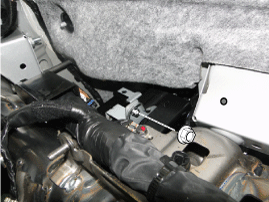
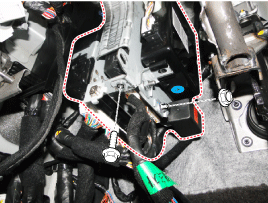
| 4. |
Remove the smart key (A) and BCM unit (B) after loosening bolt and nuts.
|
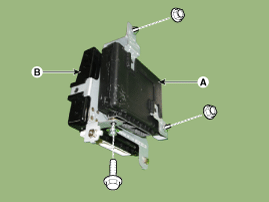
Buzzer
| 1. |
Disconnect the negative (-) battery terminal. |
| 2. |
Remove the front left wheel guard. |
| 3. |
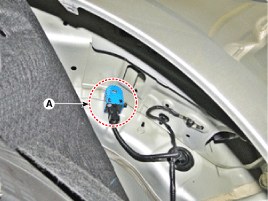
Remove the buzzer (A) after disconnecting the connector.
|
Trunk Lid Switch
| 1. |
Disconnect the negative (-) battery terminal. |
| 2. |
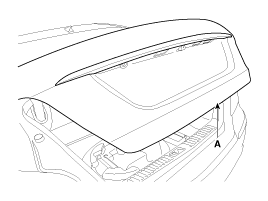
Remove the Trunk lid panel (A).
(Refer to Body - "Trunk lid panel")
|
| 3. |
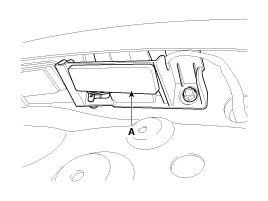
Remove the trunk lid switch from the license lamp and the trunk lid switch assembly (A) after loosening the bolts.
|
| 4. |
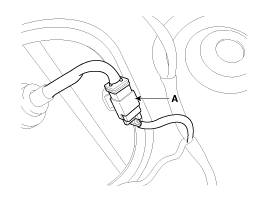
Remove the trunk lid switch after disconnecting the connector (A).
|
| Inspection |
Smart Key Unit
(Refer to Smart Key System - "Smart Key Diagnostic")
Smart Key Switch
(Refer to Smart Key System - "Smart Key Diagnostic")
Antenna
(Refer to Smart Key System - "Smart Key Diagnostic")
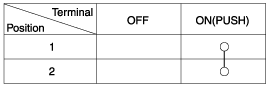
Trunk Open Switch
| 1. |
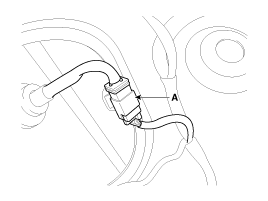
Check for continuity between the trunk open switch terminals.
|
| 2. |
If continuity is not specified, inspect the switch
|
| Installation |
Smart Key Unit
| 1. |
Install the smart key unit and BCM unit and then connect the connectors. |
| 2. |
Install the crash pad lower panel. |
| 3. |
Connect the negative (-) battery terminal. |
Buzzer
| 1. |
Install the buzzer. |
| 2. |
Install the front left wheel guard. |
| 3. |
Connect the negative (-) battery terminal. |
Trunk Lid Switch
| 1. |
Install the license lamp and trunk lid switch assembly. |
| 2. |
Install the trunk lid back panel. |
| 3. |
Connect the negative (-) battery terminal. |
 Smart Key Unit Schematic Diagrams
Circuit Diagram
...
 Smart Key Antenna Repair procedures
Removal
Interior 1 Antenna
1.
Disconnect the negative (-) battery terminal.
2.
Remove the AVN head unit.
(Refer to Premium AVN System - "AVN Head Unit")
3.
Remove the interior 1 antenna ...
See also:
Hood Assembly Components and Components Location
Component Location
1. Hood assembly
...
Schematic Diagrams
Circuit Diagram
...
Front Rear Parking Assist System Switch Components and Components Location
Component
...
Categories
Hyundai Equus Manuals

© 2011-2026 Copyright www.heqmanual.com