
 Hyundai Equus: Smart Key Antenna Repair procedures
Second generation VI (2009–2026) / Hyundai Equus VI 2009-2026 Service Manual / Body Electrical System / Smart Key System / Smart Key Antenna Repair procedures
Hyundai Equus: Smart Key Antenna Repair procedures
Second generation VI (2009–2026) / Hyundai Equus VI 2009-2026 Service Manual / Body Electrical System / Smart Key System / Smart Key Antenna Repair procedures
Second generation VI (2009–2026) / Hyundai Equus VI 2009-2026 Service Manual / Body Electrical System / Smart Key System / Smart Key Antenna Repair procedures
| Removal |
Interior 1 Antenna
| 1. |
Disconnect the negative (-) battery terminal. |
| 2. |
Remove the AVN head unit.
(Refer to Premium AVN System - "AVN Head Unit") |
| 3. |
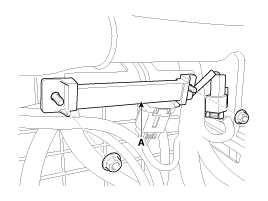
Remove the interior 1 antenna (A) after disconnecting the connector and loosening the mounting nuts.
|
Interior 2 Antenna
| 1. |
Disconnect the negative (-) battery terminal. |
| 2. |
Remove the floor console assembly.
(Refer to Body - "Floor Console Assembly") |
| 3. |
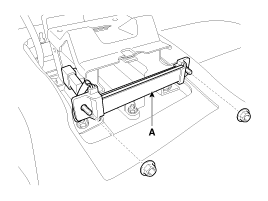
Remove the interior 2 antenna (A) after disconnecting the connector and loosening the mounting nuts.
|
Interior 3 Antenna
| 1. |
Disconnect the negative (-) battery terminal. |
| 2. |
Remove the rear seat.
(Refer to Body - "Rear Seat Assembly") |
| 3. |
Remove the rear package tray trim.
(Refer to Body - "Rear Package Tray Trim") |
| 4. |
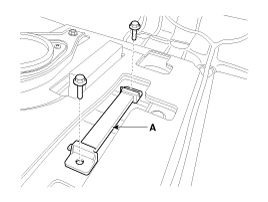
Remove the interior 3 antenna (A) after disconnecting the connector and loosening the mounting nuts.
|
Trunk Antenna
| 1. |
Disconnect the negative (-) battery terminal. |
| 2. |
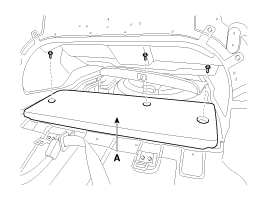
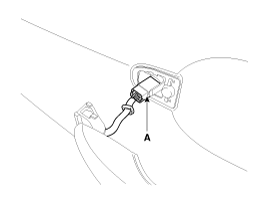
Remove the trunk carpet (A).
|
| 3. |
Remove the trunk antenna (A) after disconnecting the connector and loosening the mounting nuts.
|
Exterior Bumper Antenna
| 1. |
Disconnect the negative (-) battery terminal. |
| 2. |
Remove the rear bumper cover.
(Refer to Body - "Rear Bumper Cover") |
| 3. |
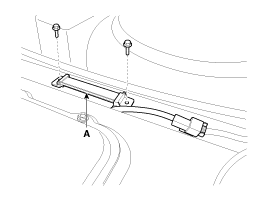
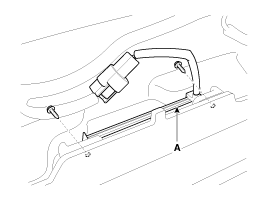
Remove the external bumper antenna (A) after loosening the mounting screws.
|
Door Outside Handle
| 1. |
Disconnect the negative (-) battery terminal. |
| 2. |
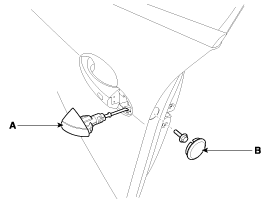
Remove the door outside handle cover (A) after seperating the plug hole (B) from the door and loosening the mounting bolt.
|
| 3. |
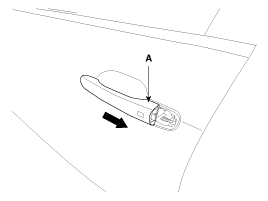
Remove the outside handle (A) by sliding it rearward.
|
| 4. |
Disconnect the front door outside handle connector (A).
|
| Installation |
Interior 1 Antenna
| 1. |
Install the interior 1 antenna after connecting the connector. |
| 2. |
Install the AVN head unit. |
| 3. |
Connect the negative (-) battery terminal. |
Interior 2 Antenna
| 1. |
Install the interior 2 antenna after connecting the connector. |
| 2. |
Install the floor console assembly. |
| 3. |
Connect the negative (-) battery terminal. |
Interior 3 Antenna
| 1. |
Install the interior 3 antenna after connecting the connector. |
| 2. |
Install the rear package tray trim. |
| 3. |
Install the rear seat. |
| 4. |
Connect the negative (-) battery terminal. |
Trunk Antenna
| 1. |
Install the trunk antenna after connecting the connector. |
| 2. |
Install the trunk carpet. |
| 3. |
Connect the negative (-) battery terminal. |
Exterior Bumper Antenna
| 1. |
Install the bumper antenna after connecting the connector. |
| 2. |
Install the rear bumper cover. |
| 3. |
Connect the negative (-) battery terminal. |
Door Outside Handle
| 1. |
Install the door outside handle after connecting the connector. |
| 2. |
Install the door trim. |
| 3. |
Connect the negative (-) battery terminal. |
 Smart Key Unit Repair procedures
Removal
Smart Key Unit
1.
Disconnect the negative (-) battery terminal.
2.
Remove the crash pad lower panel after loosening the mounting screws.
(Refer to Body - "Crash Pad Lower Panel")
...
 Smart Key Receiver Components and Components Location
Components
...
See also:
Head Up Display ON/OFF
To activate the head up display, press the HUD button.
If you press the HUD button again, the head up display will be deactivated. ...
Trailing Arm Repair procedures
Removal
1.
Remove the rear wheel and tire (A) from rear hub .
Tightening torque:
88.3 ~ 107.9 N.m (9.0 ~ 11.0 kgf.m, 65.1 ~ 79.6 lb-ft)
•
Be careful not to damage ...
General Information
General Troubleshooting Information
Before Troubleshooting
1.
Check applicable fuses in the appropriate fuse/relay box.
2.
Using the battery checker (MCR-570 KIT), check the battery for damag ...
Categories
Hyundai Equus Manuals

© 2011-2026 Copyright www.heqmanual.com