
 Hyundai Equus: Steering Wheel Remote Controller (SWRC) Repair procedures
Second generation VI (2009–2026) / Hyundai Equus VI 2009-2026 Service Manual / Body Electrical System / Premium AVN System / Steering Wheel Remote Controller (SWRC) Repair procedures
Hyundai Equus: Steering Wheel Remote Controller (SWRC) Repair procedures
Second generation VI (2009–2026) / Hyundai Equus VI 2009-2026 Service Manual / Body Electrical System / Premium AVN System / Steering Wheel Remote Controller (SWRC) Repair procedures
Second generation VI (2009–2026) / Hyundai Equus VI 2009-2026 Service Manual / Body Electrical System / Premium AVN System / Steering Wheel Remote Controller (SWRC) Repair procedures
| Inspection |
| 1. |
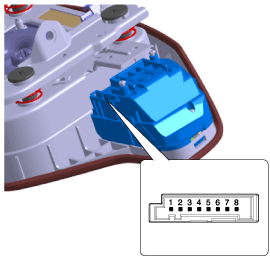
Check for resistance between terminals in each switch position.
[LH Top (Audio)]
|
| 2. |
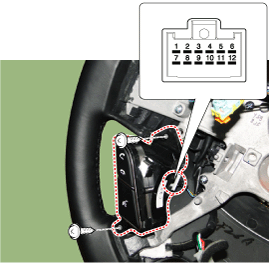
Check for resistance between terminals in each switch position.
[LH Bottom (B/T+LDWS+Mute)]
|
| 3. |
Check for resistance between terminals in each switch position.
[RH Bottom (Cruise)]
|

Inspection using GDS
| 1. |
The SWRCe can diagnose by using the GDS more quickly.
The BCM communicates with the GDS and then reads the input/output value and drives the actuator. |
| 2. |
To diagnose the SWRC function, select the menu of model and body control module. |
| 3. |
Select "Input/output monitoring", if you will check current
data of body network system. It provides input/output status of each
module. |
| Removal |
| 1. |
Disconnect the negative (-) battery terminal. |
| 2. |
Remove the driver airbag module.
(Refer to Restraint - "Driver Airbag (DAB) Module and Clock Spring") |
| 3. |
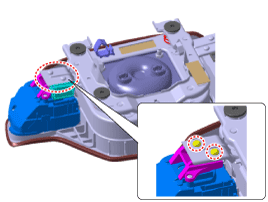
Remove the TORX screws to remove the fixed bracket.
|
| 4. |
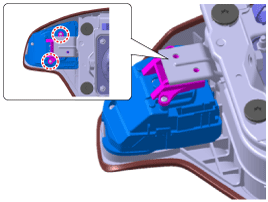
Remove the remote control swich screws to remove the fixed bracket.
|
| 5. |
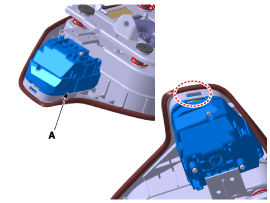
Remove the service block bracket (A) by sliding it.
|

| 6. |
Remove the steering wheel remote control switch (A) after releasing the fixed hook carefully.
|
| Installation |
| 1. |
Install teh steering wheel remote control after connecting the connector. |
| 2. |
Install the driver airbag module. |
| 3. |
Connect the negative (-) battery terminal. |
 Steering Wheel Remote Controller (SWRC) Description and Operation
Description
The steering wheel remote controller (SWR) is composed of
four switches and the right top switch is equipped with the Body CAN
communication module.
The left bottom remote control ...
 Steering Wheel Remote Controller (SWRC) Troubleshooting
Initialization and Troubleshooting Procedures
1.
Initialization Procedure
: Disconnect (connector or battery) for 30 seconds (time required for internal condenser discharge), then reconnect the p ...
See also:
Clothes hanger
To use the hanger, pull down the upper portion of hanger.
CAUTION
Do not hang heavy clothes, since those may damage the hook. ...
Photo Sensor Description and Operation
Description
The photo sensor is located at the wind shield glass.
The photo sensor contains a photovoltaic (sensitive to
sunlight) diode. The solar radiation received by its light receiving
p ...
Steering wheel audio control
The steering wheel may incorporate the audio control buttons.
CAUTION
Do not operate audio remote control buttons simultaneously.
VOLUME (VOL + / - ) (1)
Press the up button (+) to increase ...
Categories
Hyundai Equus Manuals

© 2011-2026 Copyright www.heqmanual.com