
 Hyundai Equus: Multi-view Camera Switch Repair procedures
Second generation VI (2009–2026) / Hyundai Equus VI 2009-2026 Service Manual / Body Electrical System / Multi-view Camera System / Multi-view Camera Switch Repair procedures
Hyundai Equus: Multi-view Camera Switch Repair procedures
Second generation VI (2009–2026) / Hyundai Equus VI 2009-2026 Service Manual / Body Electrical System / Multi-view Camera System / Multi-view Camera Switch Repair procedures
Second generation VI (2009–2026) / Hyundai Equus VI 2009-2026 Service Manual / Body Electrical System / Multi-view Camera System / Multi-view Camera Switch Repair procedures
| Removal |
Floor Console Switch
| 1. |
Disconnect the negative (-) battery terminal. |
| 2. |
Remove the floor console upper cover.
(Refer to Body - "Floor Console Assembly") |
| 3. |
Disconnect the console upper cover connectors.
|

| 4. |
Remove the rear curtain siwtch (A) after loosening the mounting screws.
|
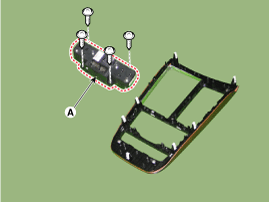
| Installation |
Floor Console Switch
| 1. |
Install the rear curtain switch. |
| 2. |
Install the console upper cover. |
 Pantoscopic Camera Repair procedures
Removal
In case of bad quality or poor focus, be sure to check the camera lense surface condition and foreign materials.
Front Pantoscopic Camera
1.
Disconnect the negati ...
 Troubleshooting
Troubleshooting
1.
After replacing multi-view camera unit, always check that the system operates properly.
2.
If the failure persists after replacing the multi-view camer ...
See also:
Rear Stabilizer Bar Repair procedures
Removal
1.
Remove the rear wheel and tire (A) from rear hub .
Tightening torque:
88.3 ~ 107.9 N.m (9.0 ~ 11.0 kgf.m, 65.1 ~ 79.6 lb-ft)
•
Be careful not to damage ...
Front Lower Arm Repair procedures
Removal
Remove the lateral arm.
1.
Remove the front wheel and tire (A) from front hub .
Tightening torque:
88.3 ~ 107.9 N.m (9.0 ~ 11.0 kgf.m, 65.1 ~ 79.6 lb-ft)
• ...
Operating HomeLink®
To operate, simply press and release the programmed HomeLink® button. Activation
will now occur for the trained device (i.e. garage door opener, gate operator, security
system, entry door lock, h ...
Categories
Hyundai Equus Manuals

© 2011-2026 Copyright www.heqmanual.com