
 Hyundai Equus: Smart Key Antenna Repair procedures
Second generation VI (2009–2026) / Hyundai Equus VI 2009-2026 Service Manual / Body Electrical System / Smart Key System / Smart Key Antenna Repair procedures
Hyundai Equus: Smart Key Antenna Repair procedures
Second generation VI (2009–2026) / Hyundai Equus VI 2009-2026 Service Manual / Body Electrical System / Smart Key System / Smart Key Antenna Repair procedures
Second generation VI (2009–2026) / Hyundai Equus VI 2009-2026 Service Manual / Body Electrical System / Smart Key System / Smart Key Antenna Repair procedures
| Removal |
Interior 1 Antenna
| 1. |
Disconnect the negative (-) battery terminal. |
| 2. |
Remove the AVN head unit.
(Refer to Premium AVN System - "AVN Head Unit") |
| 3. |
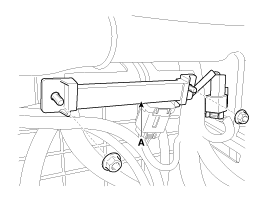
Remove the interior 1 antenna (A) after disconnecting the connector and loosening the mounting nuts.
|
Interior 2 Antenna
| 1. |
Disconnect the negative (-) battery terminal. |
| 2. |
Remove the floor console assembly.
(Refer to Body - "Floor Console Assembly") |
| 3. |
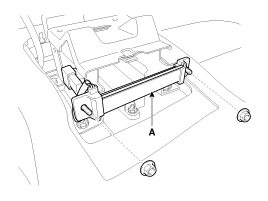
Remove the interior 2 antenna (A) after disconnecting the connector and loosening the mounting nuts.
|
Interior 3 Antenna
| 1. |
Disconnect the negative (-) battery terminal. |
| 2. |
Remove the rear seat.
(Refer to Body - "Rear Seat Assembly") |
| 3. |
Remove the rear package tray trim.
(Refer to Body - "Rear Package Tray Trim") |
| 4. |
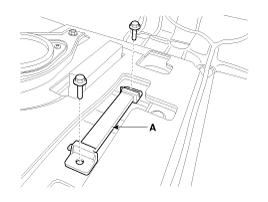
Remove the interior 3 antenna (A) after disconnecting the connector and loosening the mounting nuts.
|
Trunk Antenna
| 1. |
Disconnect the negative (-) battery terminal. |
| 2. |
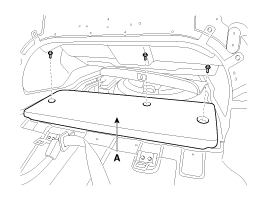
Remove the trunk carpet (A).
|
| 3. |
Remove the trunk antenna (A) after disconnecting the connector and loosening the mounting nuts.
|
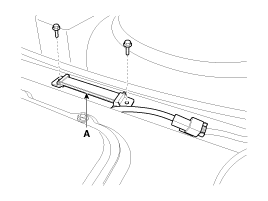
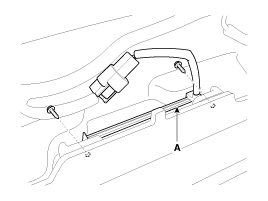
Exterior Bumper Antenna
| 1. |
Disconnect the negative (-) battery terminal. |
| 2. |
Remove the rear bumper cover.
(Refer to Body - "Rear Bumper Cover") |
| 3. |
Remove the external bumper antenna (A) after loosening the mounting screws.
|
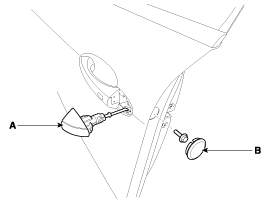
Door Outside Handle
| 1. |
Disconnect the negative (-) battery terminal. |
| 2. |
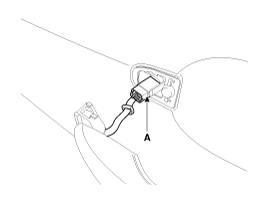
Remove the door outside handle cover (A) after seperating the plug hole (B) from the door and loosening the mounting bolt.
|
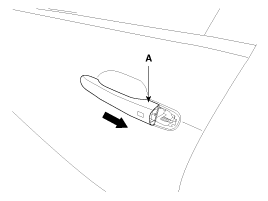
| 3. |
Remove the outside handle (A) by sliding it rearward.
|
| 4. |
Disconnect the front door outside handle connector (A).
|
| Installation |
Interior 1 Antenna
| 1. |
Install the interior 1 antenna after connecting the connector. |
| 2. |
Install the AVN head unit. |
| 3. |
Connect the negative (-) battery terminal. |
Interior 2 Antenna
| 1. |
Install the interior 2 antenna after connecting the connector. |
| 2. |
Install the floor console assembly. |
| 3. |
Connect the negative (-) battery terminal. |
Interior 3 Antenna
| 1. |
Install the interior 3 antenna after connecting the connector. |
| 2. |
Install the rear package tray trim. |
| 3. |
Install the rear seat. |
| 4. |
Connect the negative (-) battery terminal. |
Trunk Antenna
| 1. |
Install the trunk antenna after connecting the connector. |
| 2. |
Install the trunk carpet. |
| 3. |
Connect the negative (-) battery terminal. |
Exterior Bumper Antenna
| 1. |
Install the bumper antenna after connecting the connector. |
| 2. |
Install the rear bumper cover. |
| 3. |
Connect the negative (-) battery terminal. |
Door Outside Handle
| 1. |
Install the door outside handle after connecting the connector. |
| 2. |
Install the door trim. |
| 3. |
Connect the negative (-) battery terminal. |
 Smart Key Unit Repair procedures
Removal
Smart Key Unit
1.
Disconnect the negative (-) battery terminal.
2.
Remove the crash pad lower panel after loosening the mounting screws.
(Refer to Body - "Crash Pad Lower Panel")
...
 Smart Key Receiver Components and Components Location
Components
...
See also:
CVVT Oil Control Valve (OCV) Repair procedures
Inspection
1.
Turn the ignition switch OFF.
2.
Disconnect the OCV connector.
3.
Measure resistance between the OCV terminals 1 and 2.
4.
Check that the resistance is within the specifi ...
Description
The head up display is a transparent display which projects a shadow of some
information of the instrument cluster and navigation on the windshield glass.
The head up display image on the wi ...
Components and Components Location
Components
1. Cowl side trim2. Front door scuff trim3. Center pillar lower trim4. Rear door scuff trim5. Rear pillar trim6. Rear wheel house trim7. Rear package tray trim 8. Front pillar trim
...
Categories
Hyundai Equus Manuals

© 2011-2026 Copyright www.heqmanual.com