
 Hyundai Equus: Tilt & Telescope Control (SCM) Description and Operation
Second generation VI (2009–2026) / Hyundai Equus VI 2009-2026 Service Manual / Body Electrical System / IMS (Integrated Memory System) / Tilt & Telescope Control (SCM) Description and Operation
Hyundai Equus: Tilt & Telescope Control (SCM) Description and Operation
Second generation VI (2009–2026) / Hyundai Equus VI 2009-2026 Service Manual / Body Electrical System / IMS (Integrated Memory System) / Tilt & Telescope Control (SCM) Description and Operation
Second generation VI (2009–2026) / Hyundai Equus VI 2009-2026 Service Manual / Body Electrical System / IMS (Integrated Memory System) / Tilt & Telescope Control (SCM) Description and Operation
| Description |
The Tilt & Telescope operation function in SCM contains of the following function.
| 1. |
Manual control with direction switches (Tilt Up/Down, Telescope Forward/Backward). |
| 2. |
Playback with position switches (P1 and P2 switches). |
| 3. |
Memory with position switches (P1 and P2 switches). |
| 4. |
Easy Access operation control according to the IGN SW SCM =
Key Off>Key Off exception or IGN SW SCM=Key Off exception > Key Off |
| 5. |
Easy Entry Position Renewal |
| 6. |
Arbitration control |
| 7. |
Detecting error |
| 8. |
Notice (Manual, Memory Playback, Easy Access operation) |
| Operation |
Behavior For Normal State
Manual Control With Direction Switches
| 1. |
Tilt & Telescope operation is carried out in SCM
according to user handling of direction switches when the following
conditions are satisfied.
|
| 2. |
Manual has priority although self-diagnosis actuator operation order is received (actuator operation ignorance) |
Soft Limit Setting By Manual Switches
| 1. |
The basis value must be set 8000H and both direction SOFT LIMIT must be open at the first timeat B+ condition |
| 2. |
The LIMIT must be renewal in all range by MANUAL operation at the first setting of LIMIT |
| 3. |
If the error is occurred during operation, after saving the
ERROR DATA in EEPROM, easy access position is deleted and only SOFT
LIMIT to going direction is deleted. |
| 4. |
The LIMIT must be reset in all range and in easy access (get out) after recovery form error. |
| 5. |
The SOFT LIMIT is presented ±12PULSE from mechanical limit position |
Mechanical Limit Setting By Normal Operation (TILT)
| 1. |
The initial SOFT LIMIT is set 8000H (It can’t work as SOFT LIMIT) |
| 2. |
The mechanical LIMIT is renewal by MANUAL SW of TILT to up or down. |
| 3. |
If 4 pulse is not occurred in 1 sec. in running to up or down direction at the first time, the mechanical LIMIT is set. |
| 4. |
In case of the difference of both limit pulse is over 100pulse, SOFT LIMIT is set at ±12PULSE from Mechanical limit. |
Mechanical Limit Setting By Normal Operation (TELE)
| 1. |
The initial SOFT LIMIT is set 8000H (It can’t work as SOFT LIMIT) |
| 2. |
The mechanical LIMIT is renewal by MANUAL SW of TELE to push direction or pull direction. |
| 3. |
If 4 pulse is not occurred in 1 sec. in running to push
direction or pull direction at the first time, the mechanical LIMIT is
set. |
| 4. |
In case of the difference of both limit pulse is over 120pulse, SOFT LIMIT is set at ±12PULSE from Mechanical limit. |
Memory With Position Switches
When no manual operation is performing,
| - |
SCM memorizes position once if one of Mem P1 CMD or Mem P2 CMD command is changed to ON. |
| 1. |
Memory enable
|
| 2. |
Memory operation
|
| 3. |
The notice about memory
|
Easy Access Operation
The Easy Access operation function controls Tilt &
Telescope position according to IGN SW SCM = Key Off exception>Key Off
or Key Off>Key Off exception.
If IGN SW SCM = Key Off exception is changed to IGN SW SCM =
Key Off, Tilt and Telescpoe move to the maximum up SOFT LIMIT and PUSH
SOFT LIMIT direction.
And if IGN SW SCM = Key Off is changed to IGN SW SCM = Key
Off exception, Tilt and Telescope move to a position that IGN SW SCM =
Key Off exception > Key Off was occurred
Arbitration Control
Tilt & Telescope function is carried out according to the
following priority table. If Tilt & Telescope requirement happen
same time.
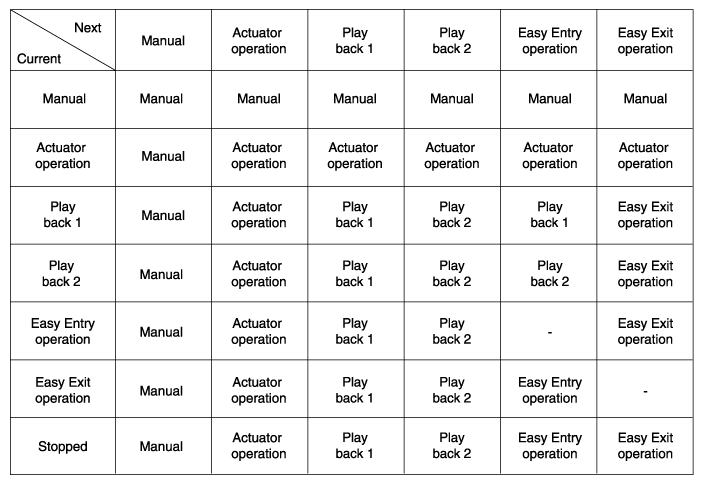
* "-" : Non-existence condition
 Memory Power Seat Switch Repair procedures
Removal
1.
Disconnect the negative (-) battery terminal.
2.
Remove the door trim (A) after loosening mounting screws.
(Refer to Body - "Front Door Trim")
3.
Remove the memory power seat c ...
 Tilt & Telescope Control (SCM) Repair procedures
Inspection
Ims Mode Setting With GDS
1.
You can turn ON/OFF of IMS tilt & telescope control option with the user option program.
2.
Select model and "body control module" menu.
3.
Sel ...
See also:
Center Fascia Panel Repair procedures
Replacement
[Center Fascia Upper Panel]
•
Put on gloves to protect your hands.
•
When prying with a flat-tip screwdriver, wrap it with ...
Rail Pressure Sensor (RPS) Troubleshooting
Signal Waveform
...
High Pressure Fuel Pump Repair procedures
Removal
In case of removing the high pressure fuel pump, high
pressure fuel pipe, delivery pipe, and injector, there may be injury
caused by leakage of the high pressure f ...
Categories
Hyundai Equus Manuals

© 2011-2026 Copyright www.heqmanual.com