
 Hyundai Equus: Smart Key Receiver Repair procedures
Second generation VI (2009–2026) / Hyundai Equus VI 2009-2026 Service Manual / Body Electrical System / Smart Key System / Smart Key Receiver Repair procedures
Hyundai Equus: Smart Key Receiver Repair procedures
Second generation VI (2009–2026) / Hyundai Equus VI 2009-2026 Service Manual / Body Electrical System / Smart Key System / Smart Key Receiver Repair procedures
Second generation VI (2009–2026) / Hyundai Equus VI 2009-2026 Service Manual / Body Electrical System / Smart Key System / Smart Key Receiver Repair procedures
| Removal |
| 1. |
Disconnect the negatiev (-) battery terminal. |
| 2. |
Remove the glove box housing.
(Refer to Body - "Glove Box Housing") |
| 3. |
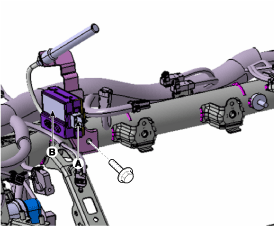
Remove the RF receiver (B) after disconnecting the connector (A) and loosening the mounting bolt.
|
| Installation |
| 1. |
Install the RF receiver after connecting the connector. |
| 2. |
Install the glove box housning. |
| 3. |
Connect the negative (-) battery terminal. |
 Smart Key Receiver Components and Components Location
Components
...
 Smart Key Diagnostic Repair procedures
Inspection
Self Diagnosis With GDS
Smart key system defects can be quickly diagnosed with the
GDS. GDS operates actuator quickly to monitor, input/output value and
self diagnosis.
The followi ...
See also:
Front Seat Assembly Repair procedures
Replacement
1.
Remove the safety belt (A) by turning it in the direction of arrow using a flat-head screwdriver.
2.
Remove the front seat track mounting cover.
3.
After loosening the mount ...
Fuel Pressure Sensor (FPS) Schematic Diagrams
Circuit Diagram
...
Crash Pad Lower Panel Components and Components Location
Component Location
1. Crash pad lower panel
...
Categories
Hyundai Equus Manuals

© 2011-2026 Copyright www.heqmanual.com