
 Hyundai Equus: Front LCD monitor Repair procedures
Second generation VI (2009–2026) / Hyundai Equus VI 2009-2026 Service Manual / Body Electrical System / Premium AVN System / Front LCD monitor Repair procedures
Hyundai Equus: Front LCD monitor Repair procedures
Second generation VI (2009–2026) / Hyundai Equus VI 2009-2026 Service Manual / Body Electrical System / Premium AVN System / Front LCD monitor Repair procedures
Second generation VI (2009–2026) / Hyundai Equus VI 2009-2026 Service Manual / Body Electrical System / Premium AVN System / Front LCD monitor Repair procedures
| Removal |
Take care not to scratch the crash pad and related parts. |

| 1. |
Disconnect the negative (-) battery terminal. |
| 2. |
Remove the center fascia upper panel.
(Refer to Body - "Center Fascia Panel") |
| 3. |
Remove the front LCD monitor after loosening the mounting screws.
|
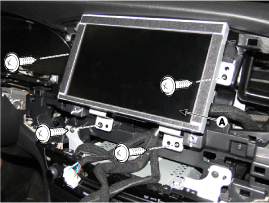
| Installation |
| 1. |
Install the front LCD monitor after connecting the connector. |
| 2. |
Install the center fascia panel.
|
 Front LCD monitor Components and Components Location
Components
...
 Rear LCD monitor Components and Components Location
Components
...
See also:
Components and Components Location
Components
1. Telematic unit (TMU)2. BlueLink keypad3. Roof Antenna4. AUX jack5. AVN or Audio head unit6. External amplifier7. Mic
...
Reservoir Tank Components and Components Location
Components Location
1. Mounting Bracket2. Pneumatic connection port3. Reservoir tank4. Check Valves
...
Power Mosfet Repair procedures
Inspection
1.
Turn the ignition switch ON.
2.
Manually operate the control switch and measure the voltage of the blower motor.
3.
Select the control switch to raise the voltage until high ...
Categories
Hyundai Equus Manuals

© 2011-2026 Copyright www.heqmanual.com