| - |
Take care not to scratch the center fascia panel and related parts. |
| - |
Eject all the disc before removing the AVN head unit to prevent damaging the DVD player's load mechanism. |
|
| 1. |
Disconnect the negative (-) battery terminal. |
| 2. |
Remove the center fascia upper and lower panel.
(Refer to Body - "Center Fascia Panel") |
| 3. |
Remove the AVN head unit (A) after loosening the mounting bolts and nuts. 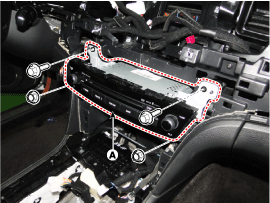
|
| 4. |
Remove the AVN head unit connectors and cables (A). 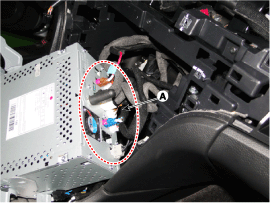
| - |
If DVD does not eject, don't try to remove it. |
| - |
The DVD player may get damaged. |
| - |
Contact the nearest Dealer for assistance.
|
|
|
| 1. |
Install the AVN head unit after connecting the AVN head unit connectors and cable. |
| 2. |
Install the center fascia lower and upper panel after connecting the connector. |
| 3. |
Connect the negative (-) battery terminal.
| - |
Make sure that the cables and connectors are plugged in properly. |
|
|
| How to Check the AVN Head Unit When Replacing It (Variant Coding) |
The AVN head unit performs basic audio, video and navigation functions.
It also receives overall information about the vehicle from
other units (SWRC, FATC, BCM, PGS, AVM, Cluster, TMU, ECS, etc.) through
CAN communication and forwards it to the driver.
Therefore, when replacing the AVN head unit, you must input
into the unit the detailed installation option information on the
vehicle to correctly use the device.
This learning process is called variant coding.
|
The following process describes the GDS based input method only. |
| 1. |
Check the options installed on the vehicle before proceeding to the AVN head unit variant coding. |
| 2. |
Select a vehicle and then select "variant coding", an additional function of the AVN head unit. |
| 3. |
Select the options installed for the vehicle.
|
If you input the wrong variant, the AVN head unit will not work correctly. |
|
After replacing the head unit, set the replacement, stop the
engine, and close and lock the door. Do not operate the car for at least
three minutes to save what has been coded.
The code is saved in the head unit only when the AVN system completely shuts down and then wakes up. |
|
| 4. |
Follow the on-screen information and standby. Wait until it has completely saved and then exit. |
Components
Connector Pin Information
No.Connector AConnector B1-MM CAN high2Rear camera vedio-3Rear camera vedio GND-4--5SPDIF GND-6SPDIF (+)IGN 1 B(+)7-AUX video8Illumination (+)AUX R input9R P ...
See also:
Engine compartment fuse replacement
1. Turn the ignition switch and all other switches off.
2. Remove the fuse panel cover by pressing the tab and pulling up.
3. Check the removed fuse; replace it if it is blown. To remove or insert ...
Heater Unit Repair procedures
Replacement
1.
Disconnect the negative (-) battery terminal.
2.
Recover the refrigerant with a recovery/recycling/charging station.
3.
When the engine is cool, drain the engine coolant fro ...
Multi-view Camera Unit Repair procedures
Removal
1.
Disconnect the negative (-) battery terminal.
2.
Remove the crash pad lower pannel.
(Refer to Body - "Crash Pad Lower Pannel")
3.
Remove the Multi-view Camera unit (A) after di ...

 Hyundai Equus: AVN(Audio Video Navigation) head unit Repair procedures
Second generation VI (2009–2026) / Hyundai Equus VI 2009-2026 Service Manual / Body Electrical System / Premium AVN System / AVN(Audio Video Navigation) head unit Repair procedures
Hyundai Equus: AVN(Audio Video Navigation) head unit Repair procedures
Second generation VI (2009–2026) / Hyundai Equus VI 2009-2026 Service Manual / Body Electrical System / Premium AVN System / AVN(Audio Video Navigation) head unit Repair procedures


 AVN(Audio Video Navigation) head unit Components and Components Location
 Front LCD monitor Components and Components Location