
 Hyundai Equus: Main Crash Pad Assembly Repair procedures
Second generation VI (2009–2026) / Hyundai Equus VI 2009-2026 Service Manual / Body (Interior and Exterior) / Crash Pad / Main Crash Pad Assembly Repair procedures
Hyundai Equus: Main Crash Pad Assembly Repair procedures
Second generation VI (2009–2026) / Hyundai Equus VI 2009-2026 Service Manual / Body (Interior and Exterior) / Crash Pad / Main Crash Pad Assembly Repair procedures
Second generation VI (2009–2026) / Hyundai Equus VI 2009-2026 Service Manual / Body (Interior and Exterior) / Crash Pad / Main Crash Pad Assembly Repair procedures
| Replacement |
|

|

| 1. |
Remove the front pillar trim.
(Refer to Interior Trim - "Front Pillar Trim") |
| 2. |
Remove the cowl side trim.
(Refer to Interior Trim - "Cowl Side Trim") |
| 3. |
Remove the front LCD monitor.
(Refer to Body Electrical System - "Front LCD Monitor") |
| 4. |
Remove the AVN head unit.
(Refer to Body Electrical System - "AVN Head Unit") |
| 5. |
Remove the instrument cluster.
(Refer to Body Electrical System - "Instrument Cluster") |
| 6. |
Remove the crach pad center panel.
(Refer to Crash Pad - "Crach Pad Center Panel") |
| 7. |
Remove the steering wheel.
(Refer to Steering System - "Steering Wheel") |
| 8. |
Remove the multifunction switch assembly.
(Refer to Body Electrical System - "Multifunction Switch") |
| 9. |
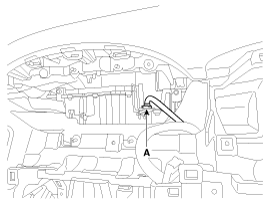
Disconnect the head up display (HUD) unit connector (A).
|
| 10. |
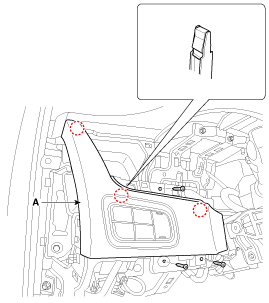
After loosening the mounting screws, then remove the crash pad upper panel [LH] (A).
|
| 11. |
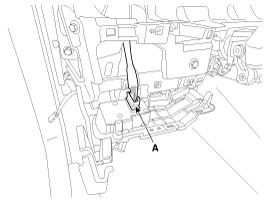
Disconnect the crash pad upper panel switch connector (A).
|
| 12. |
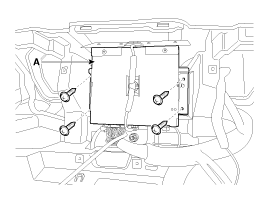
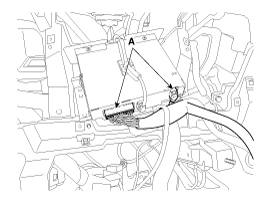
After loosening the mounting screws, then remove the cubis unit (A).
|
| 13. |
Disconnect the cubis unit connectors (A).
|
| 14. |
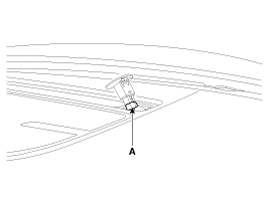
Disconnect the photo sensor connector (A).
|
| 15. |
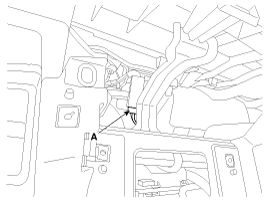
Disconnect the center speaker connector (A).
|
| 16. |
Loosen the mounting bolts. |
| 17. |
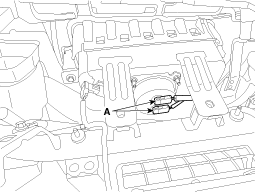
Disconnect the passenger's airbag connectors (A).
|
| 18. |
After loosening the mounting bolts and nuts, then remove the main crash pad assembly (A).
|
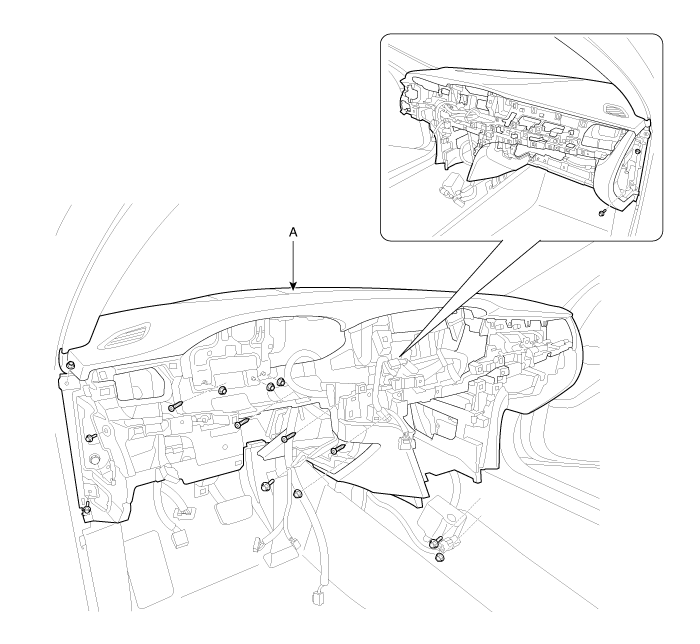
| 19. |
Install in the reverse order of removal.
|

 Main Crash Pad Assembly Components and Components Location
Component Location
1. Main crash pad assembly
...
 Cowl Cross Bar Assembly Components and Components Location
Component Location
1. Cowl cross bar assembly
...
See also:
Assist Power Seat Module(APSM) Description and Operation
Description
1.
Assist Power Seat Module (APSM)
(1)
Main features
ItemDescriptionInstallation location Lower section of the assist side seatComponent configuration
1.
Embedded with CAN Commu ...
Sliding the Sunroof
The Engine Start/Stop Button must be in the ON position before you can open or
close the sunroof.
Pressing the sunroof control lever backward or forward momentarily to the second
detent posit ...
Front Seat Assembly Components and Components Location
Component Location
1. Front seat assembly
...
Categories
Hyundai Equus Manuals

© 2011-2026 Copyright www.heqmanual.com