
 Hyundai Equus: Trip A/B

✽ NOTICE
If you reset one of the tripmeter, elapsed time, and average vehicle speed, they will be reset all together.
Tripmeter (1)
- The tripmeter is the total driving distance since the last tripmeter reset.
- Distance range: 0.0 ~ 9999.9 mi. or km
- To reset the tripmeter, press the OK button on the steering wheel for more than 1 second when the tripmeter is displayed.
Elapsed Time (2)
- The elapsed time is the total driving time since the last elapsed time reset.
- Time range (hh:mm): 00:00 ~ 99:59
- To reset the elapsed time, press the OK button on the steering wheel for more than 1 second when the elapsed time is displayed.
✽ NOTICE
Even if the vehicle is not in motion, the elapsed time keeps going while the engine is running.
Average Vehicle Speed (3)
- The average vehicle speed is calculated by the total driving distance and driving time since the last average vehicle speed reset.
- Speed range: 0 ~ 999 MPH or km/h
- To reset the average vehicle speed, press the OK button on the steering wheel for more than 1 second when the average vehicle speed is displayed.
✽ NOTICE
- The average vehicle speed is not displayed if the driving distance has been less than 0.19 miles (300 meters) since the Engine Start/Stop Button was turned to ON.
- Even if the vehicle is not in motion, the average vehicle speed keeps going while the engine is running.
Fuel Economy
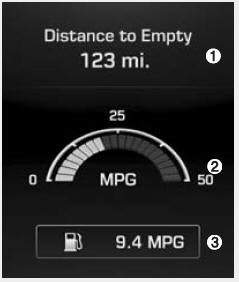
Distance To Empty (1)
- The distance to empty is the estimated distance the vehicle can be driven with the remaining fuel.
- Distance range: 30 ~ 999 mi. or 50 ~ 999 km
- If the estimated distance is below 30 mi. (50 km), the trip computer will display “---� as distance to empty.
✽ NOTICE
- If the vehicle is not on level ground or the battery power has been interrupted, the distance to empty function may not operate correctly.
- The distance to empty may differ from the actual driving distance as it is an estimate of the available driving distance.
- The trip computer may not register additional fuel if less than 1.6 gallons (6 liters) of fuel are added to the vehicle.
- The fuel economy and distance to empty may vary significantly based on driving conditions, driving habits, and condition of the vehicle.
Instant Fuel Economy (2)
- This mode displays the instant fuel economy during the last few seconds when the vehicle speed is more than 6.2 MPH (10 km/h).
- Fuel economy range: 0 ~ 50 MPG or 0 ~ 20 L/100km
Average Fuel Economy (3)
- The average fuel economy is calculated by the total driving distance and fuel consumption since the last average fuel economy reset.
- Fuel economy range: 0.0 ~ 99.9 MPG or L/100km
- The average fuel economy can be reset both manually and automatically.
Manual reset
To clear the average fuel economy manually, press the OK button on the steering wheel for more than 1 second when the average fuel economy is displayed.
Automatic reset
To make the average fuel economy be reset automatically whenever refueling, select the "Auto Reset" mode in User Setting menu of the LCD display (Refer to "LCD Display").
Under "Auto Reset" mode, the average fuel economy will be cleared to zero (---) when the vehicle speed exceeds 1 km/h after refueling more than 1.6 gallons (6 liters).
✽ NOTICE
The average fuel economy is not displayed for more accurate calculation if the vehicle does not drive more than 0.19 miles (300 meters) since the Engine Start/Stop Button is turned to ON.
 Overview
Description
The trip computer is a microcomputer- controlled driver information system that
displays information related to driving.
✽ NOTICE
Some driving information stored in the trip co ...

See also:
Engine Coolant Temperature Sensor (ECTS) Description and Operation
Description
Engine Coolant Temperature Sensor (ECTS) is located in the
engine coolant passage of the cylinder head for detecting the engine
coolant temperature. The ECTS uses a thermistor that ...
TPMS Sensor Repair procedures
Removal
Tire Removal
1.
Deflate tire & remove balance weights.
•
The tire bead should be broken approx. 90° from the valve side of the wheel. The bead breaker sho ...
Rear Seat Belt Buckle Repair procedures
Replacement
[Sedan 6:4]
1.
Remove the rear seat cushion assembly.
(Refer to Rear Seat - "Rear Seat Assembly")
2.
Loosen the mounting bolt, and then remove the rear seat belt buckle (A).
[L ...
Categories
Hyundai Equus Manuals
