
 Hyundai Equus: DRIVE mode / SNOW mode
Second generation VI (2009–2026) / Hyundai Equus 2009-2026 Owners Manual / Driving your vehicle / Cruise control system / DRIVE mode / SNOW mode
Hyundai Equus: DRIVE mode / SNOW mode
Second generation VI (2009–2026) / Hyundai Equus 2009-2026 Owners Manual / Driving your vehicle / Cruise control system / DRIVE mode / SNOW mode
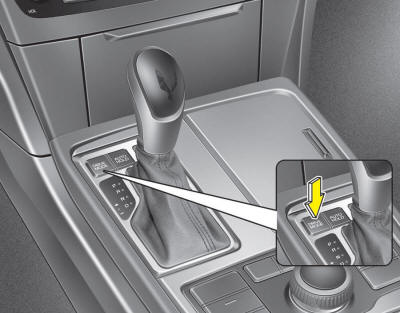
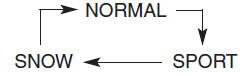
The drive mode may be selected according to the driver’s preference or road condition.
The system initializes to the NORMAL mode when the Engine Start/Stop Button is turned off and on.
It is displayed on the AVN monitor which mode the vehicle is in as below.
- SPORT
- SNOW (if equipped)
The mode changes whenever the DRIVE MODE button is pressed.
* If you turn off the User Settings Mode, the ECO indicator is not displayed.
* According to the User Settings Mode, the background changes. You can turn off the background in User Settings Mode.
ECO mode

The ECO indicator is a system that helps guide you to drive economically when you have NORMAL MODE selected.
- The ECO indicator changes color from white to green when you are driving the best for economy.
- Maximize your economy by adjust your driving habit to be less aggressive and get the most time spent with green ECO indication.
SPORT mode
SPORT mode focuses on dynamic driving by automatically controlling the steering wheel, suspension (if ECS is equipped), engine and transmission system.

- When the DRIVE MODE button is pressed and the SPORT mode is selected, the SPORT indicator will illuminate.
- If the SPORT mode is activated, and the Engine Start/Stop Button is turned off and on DRIVE mode will change to NORMAL mode. To turn on the SPORT mode, press DRIVE MODE button again.
- If the system is activated:
- Deceleration from release of accelerator pedal will result in less rapid fall
in RPM (revolutions per minute) than in the NORMAL mode.
- Up-shifting is delayed.
✽ NOTICE
In Sport drive mode, the fuel efficiency may decrease.
✽ NOTICE
If you activate the Driving Mode Theme on the User Settings Mode of the LCD display (if equipped), the SPORT and SNOW indicators will not turn on the instrument cluster.
SNOW mode (if equipped)
Snow mode helps the driver to drive more effectively on slippery roads such as snowy or muddy roads.

- When the DRIVE MODE button is pressed and the SNOW mode is selected, the SNOW indicator will illuminate.

 Electronic controlled suspension (ECS) (If equipped)
ECS controls the vehicle suspension automatically to maximize passenger comfort
by using the air spring and controllable shock absorber in the suspension.
You can also control the vehic ...
See also:
Hill-start assist control (HAC)
A vehicle has the tendency to roll back on a steep hill when the driver begins
to accelerate after a stop. The Hill-start Assist Control (HAC) prevents the vehicle
from rolling back by operating t ...
Components and Components Location
Component Location
1. Windshield deicer relay (Built-in engine room junction box)2. Windshield deicer switch3. Windshield deicer4. Deicer connector5. Body control mudule
...
Troubleshooting
Troubleshooting
Error ItemFailure symptomInspection items Detailed inspections Relevant Parts/ComponentsScreen displayTFT-LCD screen does not turn on
1.
Connector attachments
2.
Components
...
Categories
Hyundai Equus Manuals
