
 Hyundai Equus: Smart cruise control vehicle to vehicle distance
Second generation VI (2009–2026) / Hyundai Equus 2009-2026 Owners Manual / Driving your vehicle / Advanced smart cruise control system (If equipped) / Smart cruise control vehicle to vehicle distance
Hyundai Equus: Smart cruise control vehicle to vehicle distance
Second generation VI (2009–2026) / Hyundai Equus 2009-2026 Owners Manual / Driving your vehicle / Advanced smart cruise control system (If equipped) / Smart cruise control vehicle to vehicle distance
To set vehicle to vehicle distance:

This function allows you to program the vehicle to maintain relative distance to the vehicle ahead without depressing the accelerator pedal or brake pedal.
The vehicle to vehicle distance will automatically activate when the smart cruise control system is on.
Select the appropriate distance according to road conditions and vehicle speed.
Each time the button is pressed, the vehicle to vehicle distance changes as follows:
For example, if you drive at 56 mph (90 km/h), the distance maintains as follows:

Distance 4 - approximately 170 feet
Distance 3 - approximately 131 feet
Distance 2 - approximately 106 feet
Distance 1 - approximately 82 feet
✽ NOTICE
The 'Distance 4' is always set when the system is used for the first time after starting the engine.
When the lane ahead is clear:

- The vehicle speed will maintain the set speed.
- Your vehicle speed will slow down or speed up to maintain the selected distance.
- If the vehicle ahead speeds up, your vehicle will travel at a steady cruising speed after accelerating to the set speed.
CAUTION
- The warning chime sounds and the malfunction indicator blinks if the vehicle is unable to maintain the selected distance from the vehicle ahead.
- If the warning chime sounds, actively adjust the vehicle speed, as well as the distance to the vehicle ahead by depressing the accelerator or brake pedal.
- Even if the warning chime is not activated, always pay attention to the driving conditions to prevent dangerous situations from occurring.
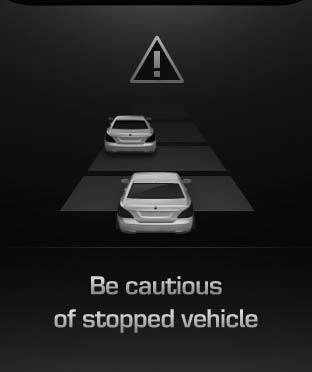
CAUTION
If the vehicle ahead (vehicle speed: less than 20 mph (30 km/h)) disappears to the next lane, the warning chime will sound and a message will appear. Adjust your vehicle speed for vehicles or objects that can suddenly appear in front of you by depressing the brake pedal according to the road condition ahead and driving condition.
In traffic situation
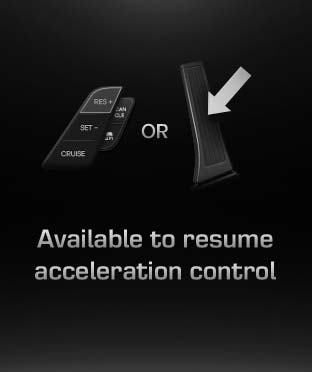
In traffic, your vehicle will stop if the vehicle ahead of you stops. Also, if the vehicle ahead of you starts moving, your vehicle will start as well.
However, if the vehicle stops for more than 3 seconds, you must depress the accelerator pedal or push the RES+ switch to start driving.
 Smart cruise control speed
To set cruise control speed:
1. Push the CRUISE (ON·OFF) button on the steering wheel to turn the system on.
The CRUISE indicator light in the instrument cluster will illuminate.
2. Accelerat ...
 Distance to distance vehicle sensor
The sensor detects distance to the vehicle ahead.
If the sensor is covered with dirt or other foreign matter, the vehicle to vehicle
distance control may not operate correctly.
Always keep the ...
See also:
Start/Stop Button Components and Components Location
Component
...
Schematic Diagrams
Schematic Diagram
Canister
Canister is filled with charcoal and absorbs evaporated vapor
in fuel tank. The gathered fuel vapor in canister is drawn into the
intake manifold by the ECM/PCM when ...
Spark plugs
Make sure to install new spark plugs of the correct heat range. ...
Categories
Hyundai Equus Manuals
