
 Hyundai Equus: Rear Hub - Carrier Repair procedures
Second generation VI (2009–2026) / Hyundai Equus VI 2009-2026 Service Manual / Driveshaft and axle / Rear Axle Assembly / Rear Hub - Carrier Repair procedures
Hyundai Equus: Rear Hub - Carrier Repair procedures
Second generation VI (2009–2026) / Hyundai Equus VI 2009-2026 Service Manual / Driveshaft and axle / Rear Axle Assembly / Rear Hub - Carrier Repair procedures
Second generation VI (2009–2026) / Hyundai Equus VI 2009-2026 Service Manual / Driveshaft and axle / Rear Axle Assembly / Rear Hub - Carrier Repair procedures
| Replacement |
| 1. |
Loosen the wheel nuts slightly.
Raise the vehicle, and make sure it is securely supported. |
| 2. |
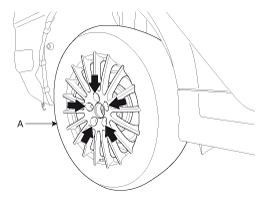
Remove the rear wheel and tire (A) from rear hub .
|

| 3. |
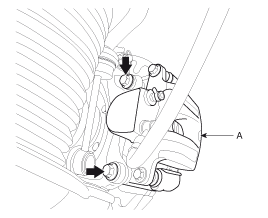
Remove the brake caliper mounting bolts, and then hold the brake caliper assembly (A) with wire as shown in the illustration.
|
| 4. |
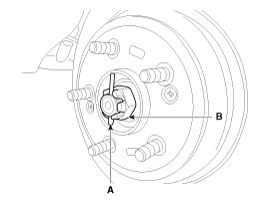
Remove the split pin (A) then remove castle nut (B) and washer from the front hub under applying the brake.
|
| 5. |
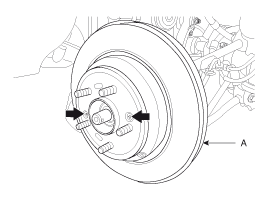
Remove the rear brake disc (A).
|
| 6. |
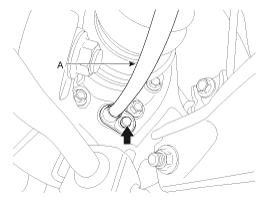
Disconnect the parking brake cable (A).
|
| 7. |
Remove the rear brake lining.
(Refer to Brake System -"Rear Brake") |
| 8. |
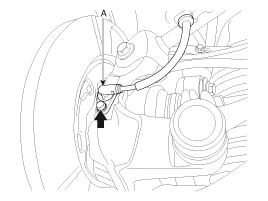
Remove the wheel speed sensor (A) from the rear axle carrier.
|
| 9. |
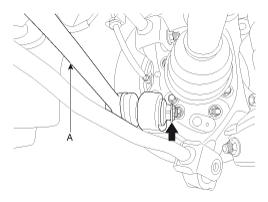
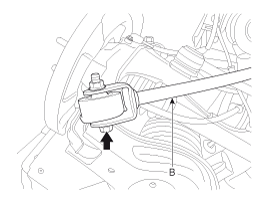
Remove the assist arm (A) and the trailing arm (B) from the rear axle carrier.
|
| 10. |
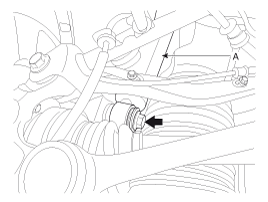
Remove the shock absorber mounting bolt (A).
|
| 11. |
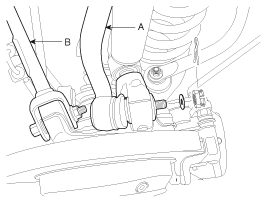
Loosen the front upper arm & rear upper arm link mount
bolts and then remove the front upper arm (A) & rear upper arm (B)
link.
|
| 12. |
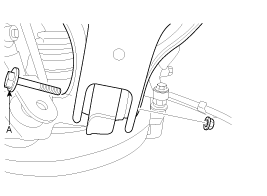
Remove lower arm mount bolt (A) from rear axle carrier.
|
| 13. |
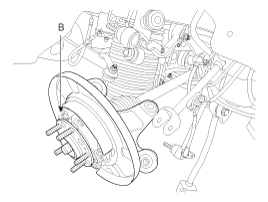
Remove the hub assembly mount bolts (B) from the rear axle carrier (A).
|
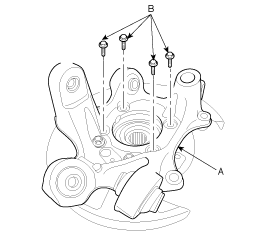
| 14. |
Installation is the reverse order of removal. |
| Inspection |
| 1. |
Check the hub for cracks and the splines for wear. |
| 2. |
Check the brake disc for scoring and damage. |
| 3. |
Check the knuckle for cracks. |
| 4. |
Check the bearing for cracks or damage. |
 Rear Hub - Carrier Components and Components Location
Component
1. Rear hub assembly2. Dust cover3. Rear knuckle4. Rear brake disc
...

See also:
Repair procedures
Removal
•
Put on gloves to protect your hands.
•
Use seat covers to avoid damaging any surfaces.
1.
Remove the roof side molding.
...
Description and Operation
Description
System Overview
The System offers the following features:
-
Human machine interface through a 1-stage button, for terminal switching and engine start.
-
Control of external re ...
Keep your garage dry
Don't park your car in a damp, poorly ventilated garage. This creates a favorable
environment for corrosion.
This is particularly true if you wash your car in the garage or drive it into
the ...
Categories
Hyundai Equus Manuals

© 2011-2026 Copyright www.heqmanual.com