
 Hyundai Equus: Aux, USB and iPod® port
Second generation VI (2009–2026) / Hyundai Equus 2009-2026 Owners Manual / Features of your vehicle / Interior features / Aux, USB and iPod® port
Hyundai Equus: Aux, USB and iPod® port
Second generation VI (2009–2026) / Hyundai Equus 2009-2026 Owners Manual / Features of your vehicle / Interior features / Aux, USB and iPod® port
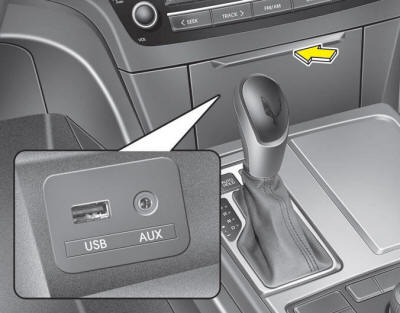
If your vehicle has an aux and/or USB(universal serial bus) port or iPod® port, you can use an aux port to connect audio devices and a USB port to plug in a USB, and an iPod® port to plug in an iPod®.
✽ NOTICE
When using a portable audio device connected to the power outlet, noise may occur during playback. If this happens, use the power source of the portable audio device.
 Rear curtain
To raise the rear curtain, depress the button. To lower the rear curtain, depress
the button again.
The rear curtain will be lowered automatically when you shift the shift lever
into R (Rever ...
 Multimedia system
✽ NOTICE
If you install an aftermarket HID head lamp, your vehicle’s audio and
electronic device may malfunction.
Prevent chemicals such as perfume, cosmetic oil, sun cream, hand cle ...
See also:
Injector Schematic Diagrams
Circuit Diagram
...
Description and Operation
Memory Power Seat (PSM) Control (For Driver)
Description
The seat operation function in PSM contains the following functions.
1.
Manual control(CAN Signal data from DDM to PDM) with manual switc ...
Operating Door Locks From Inside the Vehicle
With the Door Lock Button :
To unlock a door, push the door lock button (1) to the “Unlock� position.
The red mark (2) on the door lock button will be visible.
To lock a door, push the ...
Categories
Hyundai Equus Manuals
