
 Hyundai Equus: Trip Computer Mode
Second generation VI (2009–2026) / Hyundai Equus 2009-2026 Owners Manual / Features of your vehicle / LCD Display / Trip Computer Mode
Hyundai Equus: Trip Computer Mode
Second generation VI (2009–2026) / Hyundai Equus 2009-2026 Owners Manual / Features of your vehicle / LCD Display / Trip Computer Mode
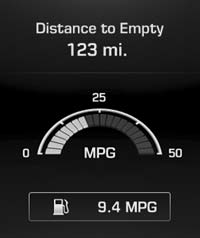
This mode displays driving information like the tripmeter, fuel economy, and so on.
❈ For more details, refer to “Trip Computerâ€� in this chapter.
 LCD Modes
...
 ASCC/LDWS Mode (if equipped)
This mode displays the state of the Advanced Smart Cruise Control (ASCC) and
Lane Departure Warning System (LDWS).
❈ For more details, refer to "Advanced Smart Cruise Control (ASCC)&q ...
See also:
Inhibitor Switch Description and Operation
Description
Inhibitor Switch monitors the lever's position(PRND) and is used to control gear setting signals. ...
Steering wheel audio control
The steering wheel may incorporate the audio control buttons.
CAUTION
Do not operate audio remote control buttons simultaneously.
VOLUME (VOL + / - ) (1)
Press the up button (+) to increase ...
Tire specification and pressure label
The tires supplied on your new vehicle are chosen to provide the best performance
for normal driving.
The tire label located on the driver's side center pillar gives the tire pressures
re ...
Categories
Hyundai Equus Manuals
