
 Hyundai Equus: LCD Display Control
Second generation VI (2009–2026) / Hyundai Equus 2009-2026 Owners Manual / Features of your vehicle / Instrument cluster / LCD Display Control
Hyundai Equus: LCD Display Control
Second generation VI (2009–2026) / Hyundai Equus 2009-2026 Owners Manual / Features of your vehicle / Instrument cluster / LCD Display Control
The LCD display modes can be changed by using the control buttons on the steering wheel.
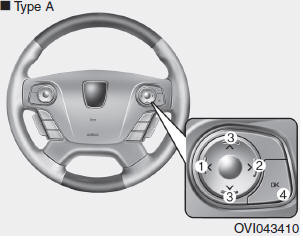
1)  button : Changing LCD modes
(right to left), or returning to previous position
(2)  button : Changing LCD
modes (left to right)
(3)  ,
,
button : Changing items (upper or lower)
(4) OK button : selecting or resetting
❈ For the LCD modes, refer to "LCD Display" in this chapter.
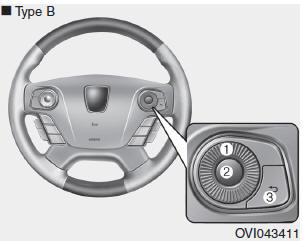
(1) Haptic switch : changing LCD modes or items
(2) OK button : selecting or resetting
(3) RETURN button : returning to previous position
You can adjust the rotating effort of the haptic switch on the "User Settings Mode" of the LCD Display
❈ For more details, refer to "LCD Display" to in this chapter.
 Instrument Cluster Control
Adjusting Instrument Cluster Illumination
The brightness of the instrument panel illumination can be adjusted by pressing
the illumination control buttons (“+� or “-�) when the Engine S ...
 Gauges
Speedometer
The speedometer indicates the speed of the vehicle and is calibrated in miles
per hour (mph) and/or kilometers per hour (km/h).
✽ NOTICE
On the "User Settings Mode" ...
See also:
Description and Operation
Description
The hydraulic system consists of oil, an oil filter, an oil pump, and a valve body (valves and solenoid valves).
The oil pump is powered by the engine. ATF passes through the oil filt ...
Automatic Transmission Components and Components Location
Components Location
1. Automatic transmission case2. Inhibitor switch3. Manual control lever4. Shift cable bracket5. Oil injection hole6. Air breather hose & pipe7. Oil injection hole (in fac ...
Components and Components Location
Components
1. Telematic unit (TMU)2. BlueLink keypad3. Roof Antenna4. AUX jack5. AVN or Audio head unit6. External amplifier7. Mic
...
Categories
Hyundai Equus Manuals
