
 Hyundai Equus: Battery Replacement
Second generation VI (2009–2026) / Hyundai Equus 2009-2026 Owners Manual / Features of your vehicle / Keys / Battery Replacement
Hyundai Equus: Battery Replacement
Second generation VI (2009–2026) / Hyundai Equus 2009-2026 Owners Manual / Features of your vehicle / Keys / Battery Replacement
If the Smart Key is not working properly, try replacing the battery with a new one.
Battery Replacement of Conventional Smart Key
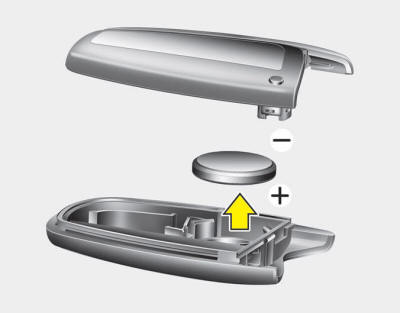
Battery Type: CR2032 To Replace the Battery:
1. Pry open the rear cover of the Smart Key.
2. Remove the old battery and insert the new battery. Make sure the battery position
is correct.
3. Reinstall the rear cover of the Smart Key.
Battery Replacement of Card Type Smart Key
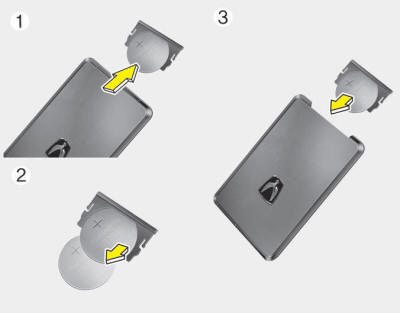
Battery Type: CR2412 To Replace the Battery:
1. Pull out the battery and battery cover.
2. Remove the old battery and insert the new battery. Make sure the battery position
is correct.
3. Reinstall the battery cover and battery.
✽ NOTICE
- If you suspect your Smart Key might have sustained some damage, or you feel your Smart Key is not working correctly, contact an authorized EQUUS dealer.

- •An inappropriately disposed battery can be harmful to the environment and human health. Dispose of the battery according to your local law(s) and regulation(s).
 Restrictions in Handling Keys
When leaving keys with parking lot and valet attendants, the following procedures
will ensure your vehicle’s trunk and glove box compartment can only be opened with
the mechanical key.
To l ...
 Theft-alarm system
This system helps to protect your vehicle and valuables. The horn will sound
and the hazard warning lights will blink continuously if any of the following occurs:
- A door is opened without using t ...
See also:
Compass function
The Compass can be turned ON and OFF and will remember the last state when the
ignition is cycled. To turn the display feature ON/OFF:
1. Press and release the button
to turn the display feature ...
Components and Components Location
Component Location
1. AVN head unit2. Front LCD monitor3. Blue Link keyboard (Option)4. AUX jack5. Rear monitor spliter6. Steering wheel remote controller (SWRC)7. AVN rear keyboard8. External am ...
Front Impact Sensor (FIS) Description and Operation
Description
The front impact sensor (FIS) is installed in the Front End
Module (FEM). They are remote sensors that detect acceleration due to a
collision at its mounting location. The primary p ...
Categories
Hyundai Equus Manuals
