
 Hyundai Equus: Head Up Display Switch Repair procedures
Second generation VI (2009–2026) / Hyundai Equus VI 2009-2026 Service Manual / Body Electrical System / Head Up Display System / Head Up Display Switch Repair procedures
Hyundai Equus: Head Up Display Switch Repair procedures
Second generation VI (2009–2026) / Hyundai Equus VI 2009-2026 Service Manual / Body Electrical System / Head Up Display System / Head Up Display Switch Repair procedures
Second generation VI (2009–2026) / Hyundai Equus VI 2009-2026 Service Manual / Body Electrical System / Head Up Display System / Head Up Display Switch Repair procedures
| Removal |
| 1. |
Disconnect the negative (-) battery. |
| 2. |
Remove the crash pad lower panel.
(Refer to Body - "Crash Pad Lower Panel") |
| 3. |
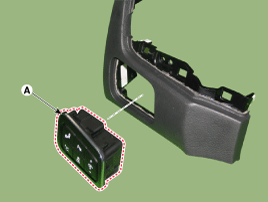
Remove the crash pad lower panel and then push the head up display switch (A) to remove it.
|

| Installation |
| 1. |
Install the head up display switch after connecting the connector. |
| 2. |
Install the crash pad lower panel. |
| Inspection |
| 1. |
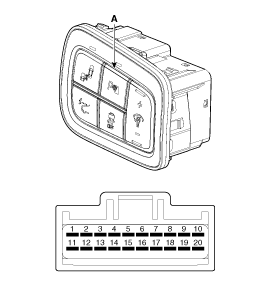
Remove the HUD switch.
|
| 2. |
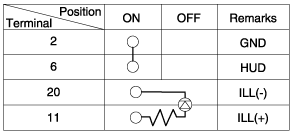
Operate the HUD switch, then check for continuity between terminals of HUD switch connector.
|

 Troubleshooting
Troubleshooting
Category Error symptoms inspection item Detailed inspection item Related partsLighting
•
HUD not working
•
Lighting brightness not automatically controlled (no diff ...
See also:
Passenger Airbag (PAB) Module Components and Components Location
Components
...
Blade inspection
✽ NOTICE
Commercial hot waxes applied by automatic car washes have been known to make
the windshield difficult to clean.
Contamination of either the windshield or the wiper blades with ...
Sunvisor Components and Components Location
Component Location
1. Sunvisor2. Retainer
...
Categories
Hyundai Equus Manuals

© 2011-2026 Copyright www.heqmanual.com