
 Hyundai Equus: Side Impact Sensor (SIS) Repair procedures
Second generation VI (2009–2026) / Hyundai Equus VI 2009-2026 Service Manual / Restraint / SRSCM / Side Impact Sensor (SIS) Repair procedures
Hyundai Equus: Side Impact Sensor (SIS) Repair procedures
Second generation VI (2009–2026) / Hyundai Equus VI 2009-2026 Service Manual / Restraint / SRSCM / Side Impact Sensor (SIS) Repair procedures
Second generation VI (2009–2026) / Hyundai Equus VI 2009-2026 Service Manual / Restraint / SRSCM / Side Impact Sensor (SIS) Repair procedures
| Removal |
|

Front Side Impact Sensor
| 1. |
Disconnect the battery negative cable, and wait for at least three minutes before beginning work. |
| 2. |
Remove the front door trim.
(Refer to Body - "Front Door Trim") |
| 3. |
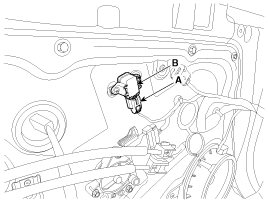
Disconnect the front side impact sensor connector (A), and
then remove the front side impact sensor mounting screws to remove the
sensor (B).
|
Rear Side Impact Sensor
| 1. |
Disconnect the battery negative cable and wait for at least three minutes before beginning work. |
| 2. |
Remove the rear wheel house trim.
(Refer to Body - " Rear Wheel House Trim") |
| 3. |
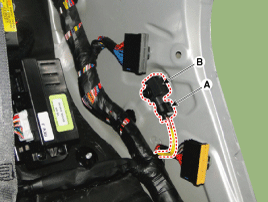
Disconnect the rear side impact sensor connector (A), and
then loosen the rear side impact sensor mounting bolt to remove the rear
side impact sensor (B).
|
| Installation |
Do not turn the ignition switch ON and do not connect the battery cable while replacing the side impact sensor.
|
Front Side Impact Sensor
| 1. |
Install the new front side impact sensor with the screws, then connect the front side impact sensor connector.
|
| 2. |
Install the front door trim.
(Refer to Body - "Front Door Trim") |
| 3. |
Reconnect the battery negative cable. |
| 4. |
After installing the front side impact sensor, confirm proper system operation:
Turn the ignition switch ON; the SRS indicator light should turn on for about six seconds and then go off. |
Rear Side Impact Sensor
| 1. |
Install the new rear side impact sensor with a bolt and then connect the rear side impact sensor connector.
|
| 2. |
Install the rear wheel house trim.
(Refer to Body - "Rear Wheel House Trim") |
| 3. |
Reconnect the battery negative cable. |
| 4. |
After installing the rear side impact sensor, confirm proper system operation:
Turn the ignition switch ON; the SRS indicator light should turn on for about six seconds and then go off. |
 Side Impact Sensor (SIS) Components and Components Location
Components
...
 Seat Belt Buckle Switch (BS) Description and Operation
Description
The SRSCM monitors the status of the driver and front
passenger seat belt buckle. The SRSCM provides one pin each for the
driver and front passenger seat belt buckle status input. T ...
See also:
Specifications
Specification
ItemSpecificationPower source3VOperating temperature-20°C ~ +60°C (-4°F ~ +140°F)RF ModulationFSKLF ModulationASKRF frequency433.92MHzLife of battery2years or more (at 20 times ...
Shift Lever Components and Components Location
Components
1. Shift lever knob2. Shift lever boots3. Shift lever assembly4. Shift cable
...
Driver's attention
The driver must be cautious in the below situations for the system may not assist
the driver and may not work properly.
The lane is not visible due to snow, rain, stain, a puddle or many other
...
Categories
Hyundai Equus Manuals

© 2011-2026 Copyright www.heqmanual.com