
 Hyundai Equus: Programming
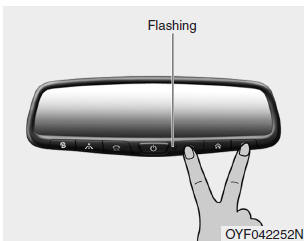
To train most devices, follow these instructions:
1. For first-time programming, press and hold the two outside buttons (
 ,
,
), HomeLink® Channel 1 and Channel 3, until the indicator light begins to flash
(after 10 seconds). Release both buttons. Do not hold the buttons for longer than
20 seconds.
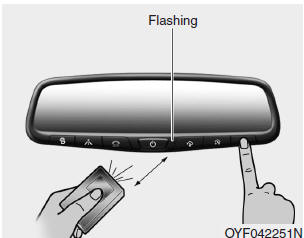
2. Position the end of your hand-held transmitter 1-3 inches (2-8 cm) away from the HomeLink® button you wish to program while keeping the indicator light in view.
3. Simultaneously press and hold both the HomeLink® and handheld transmitter buttons until the HomeLink® indicator light changes from a slow to a rapid blinking light. Now you may release both the HomeLink® and hand-held transmitter buttons.
✽ NOTICE
Some devices may require you to replace this Programming step 3 with procedures noted in the "Gate Operator/Canadian Programming" section. If the HomeLink® indicator light does not change to a rapidly blinking light after performing these steps, contact HomeLink® at www.homelink.com.
4. Firmly press, hold for 5 seconds and release the programmed HomeLink® button up to two separate times to activate the door. If the door does not activate, press and hold the just-trained HomeLink® button and observe the indicator light.
- If the indicator light stays on constantly, programming is complete and your device should activate when the HomeLink® button is pressed and released.
- If the indicator light blinks rapidly for 2 seconds and then turns to a constant light, continue with "Programming" steps 5-7 to complete the programming of a rolling code equipped device (most commonly a garage door opener).
5. At the garage door opener receiver (motor-head unit) in the garage, locate the "leam" or "smart" button. This can usually be found where the hanging antenna wire is attached to the motor-head unit.
6. Firmly press and release the "leam" or "smart" button. (The name and color of the button vary by manufacturer). There are 30 seconds to initiate step 7.
7. Return to the vehicle and firmly press, hold for 2 seconds and release the programmed HomeLink® button. Repeat the "press/hold/release" sequence a second time, and, depending on the brand of the garage door opener (or other rolling code equipped device), repeat this sequence a third time to complete the programming process.
HomeLink® should now activate your rolling code equipped device.
 Programming HomeLink®
✽ NOTICE
When programming a garage door opener, it is advised to park the vehicle
outside of the garage. • It is recommended that a new battery be placed in the
hand-held transmitte ...
 Gate operator & Canadian programming
During programming, your handheld transmitter may automatically stop transmitting.
Continue to press the Integrated HomeLink® Wireless Control System button (note
steps 2 through 3 in the Program ...
See also:
Description and Operation
Description
When reversing, the driver is not easy to find objects in the
blind spots and to determine the distance from the object. In order to
provide the driver safety and convenience, back ...
Turn By Turn (TBT) Mode (if equipped)
This mode displays the state of the navigation. ...
Repair procedures
Inspection
Check it by the procedure below to see if the function of the ECM is normal.
1.
Turn the ignition key to the "ON" position.
2.
Cover the front looking sensor to stop functioning.
...
Categories
Hyundai Equus Manuals
