
 Hyundai Equus: Head Up Display Switch Repair procedures
Second generation VI (2009–2026) / Hyundai Equus VI 2009-2026 Service Manual / Body Electrical System / Head Up Display System / Head Up Display Switch Repair procedures
Hyundai Equus: Head Up Display Switch Repair procedures
Second generation VI (2009–2026) / Hyundai Equus VI 2009-2026 Service Manual / Body Electrical System / Head Up Display System / Head Up Display Switch Repair procedures
Second generation VI (2009–2026) / Hyundai Equus VI 2009-2026 Service Manual / Body Electrical System / Head Up Display System / Head Up Display Switch Repair procedures
| Removal |
| 1. |
Disconnect the negative (-) battery. |
| 2. |
Remove the crash pad lower panel.
(Refer to Body - "Crash Pad Lower Panel") |
| 3. |
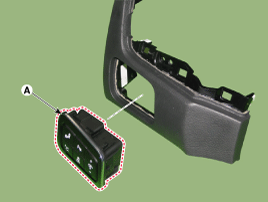
Remove the crash pad lower panel and then push the head up display switch (A) to remove it.
|

| Installation |
| 1. |
Install the head up display switch after connecting the connector. |
| 2. |
Install the crash pad lower panel. |
| Inspection |
| 1. |
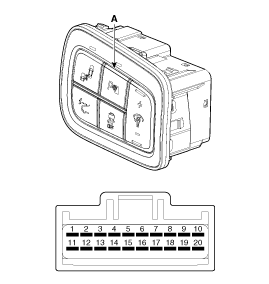
Remove the HUD switch.
|
| 2. |
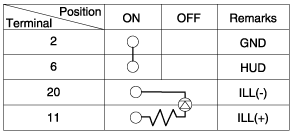
Operate the HUD switch, then check for continuity between terminals of HUD switch connector.
|

 Troubleshooting
Troubleshooting
Category Error symptoms inspection item Detailed inspection item Related partsLighting
•
HUD not working
•
Lighting brightness not automatically controlled (no diff ...
See also:
Description and Operation
Description of ESP
Optimum driving safety now has a name: ESP, the Electronic Stability Program.
ESP recognizes critical driving conditions, such as panic
reactions in dangerous situations, a ...
G Sensor Schematic Diagrams
Circuit diagram
1.
G-sensor connector
2.
G-sensor terminal function
NoFunction1Signal2Ground3Power(5V)
3.
Circuit diagram ...
Snow tires
If you equip your car with snow tires, they should be the same size and have
the same load capacity as the original tires. Snow tires should be installed on
all four wheels; otherwise, poor handli ...
Categories
Hyundai Equus Manuals

© 2011-2026 Copyright www.heqmanual.com