
 Hyundai Equus: Repair procedures
| Removal |
Front Blind Camera
| 1. |
Remove the front bumper cover.
(Refer to Body - "Front Bumper") |
| 2. |
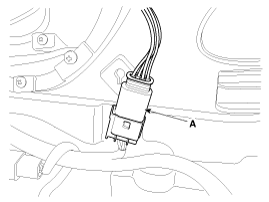
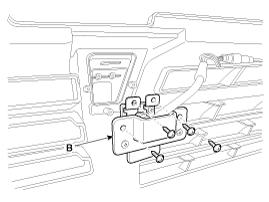
Remove the front blind camera (B) after removing the connector (A) and screws (4EA).
|
Back View Camera
| 1. |
Remove the screws, clip and trunk lid trim in the trunk.
(Refer to Body - "Trunk Lid") |
| 2. |
Remove the trunk lid panel. |
| 3. |
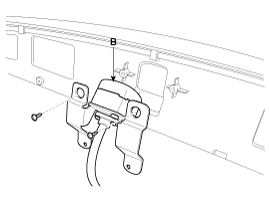
Remove the back view camera (B) after removing the connector (A) and screws (2EA).
|
Front Back View Camera Unit
| 1. |
Disconnect the negative (-) battery terminal. |
| 2. |
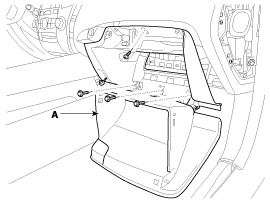
Remove glove box housing (A).
(Refer to Body - "Crash Pad")
|
| 3. |
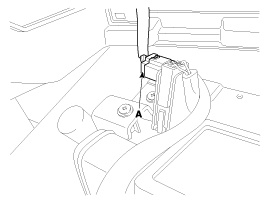
Disconnect the glove box housing connector (A).
|
| 4. |
Remove the DIS head unit.
(Refer to Body - "DIS System") |
| 5. |
Remove the USB interface unit. |
| 6. |
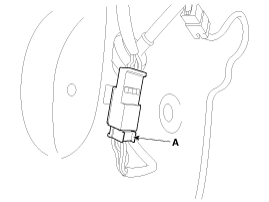
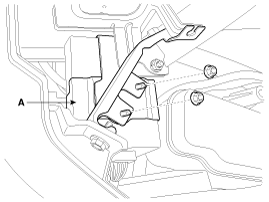
Remove the front back view camera unit (A) after removing the nuts (2EA) and connector.
|
| Installation |
Front blind camera
| 1. |
Install the front blind camera. |
| 2. |
Install the front bumper cover. |
Back view camera
| 1. |
Install the back view camera. |
| 2. |
Install the trunk lid panel and trim. |
Front Back view camera unit
| 1. |
Install the front back view camera unit. |
| 2. |
Install the USB interface unit |
| 3. |
Install the DIS head unit. |
| 4. |
Install the glove box and housing. |
 Description and Operation
Description
Front blind camera is a supplemental system that shows blind spot in front of the vehicle through the AV monitor.
The front blind camera will operate when you push the button
and shi ...

See also:
Telemetics Unit (TMU) Repair procedures
Removal
1.
Disconnect the negative (-) battery terminal.
2.
Remove the front AVN monitor.
(Refer to "Premium AVN System")
3.
Remove the MTS unit after loosening the screw and nuts.
4.
...
Ignition Coil Schematic Diagrams
Circuit Diagram
...
Relay Box (Passenger Compartment) Description and Operation
Description
1.
Smart Junction Box(SJB)
(1)
General function : Interior Junction Box + some functions of BCM
(2)
It controls loads with CAN communication and IPS.
(3)
IPS stands for Intel ...
Categories
Hyundai Equus Manuals

© 2011-2026 Copyright www.heqmanual.com